Get LessPrep Studio.
Pay what you want.
A local Windows workspace for making worksheets and learner materials from editable pieces — a real canvas, a searchable sticker library, and optional on-device art.
It's in active development, and it's pay what you want — including $0. Grab it, use it, and pay whatever it's worth to you if it saves you time.
Secure checkout via LemonSqueezy · Windows 10/11 · ~5 GB download · runs locally
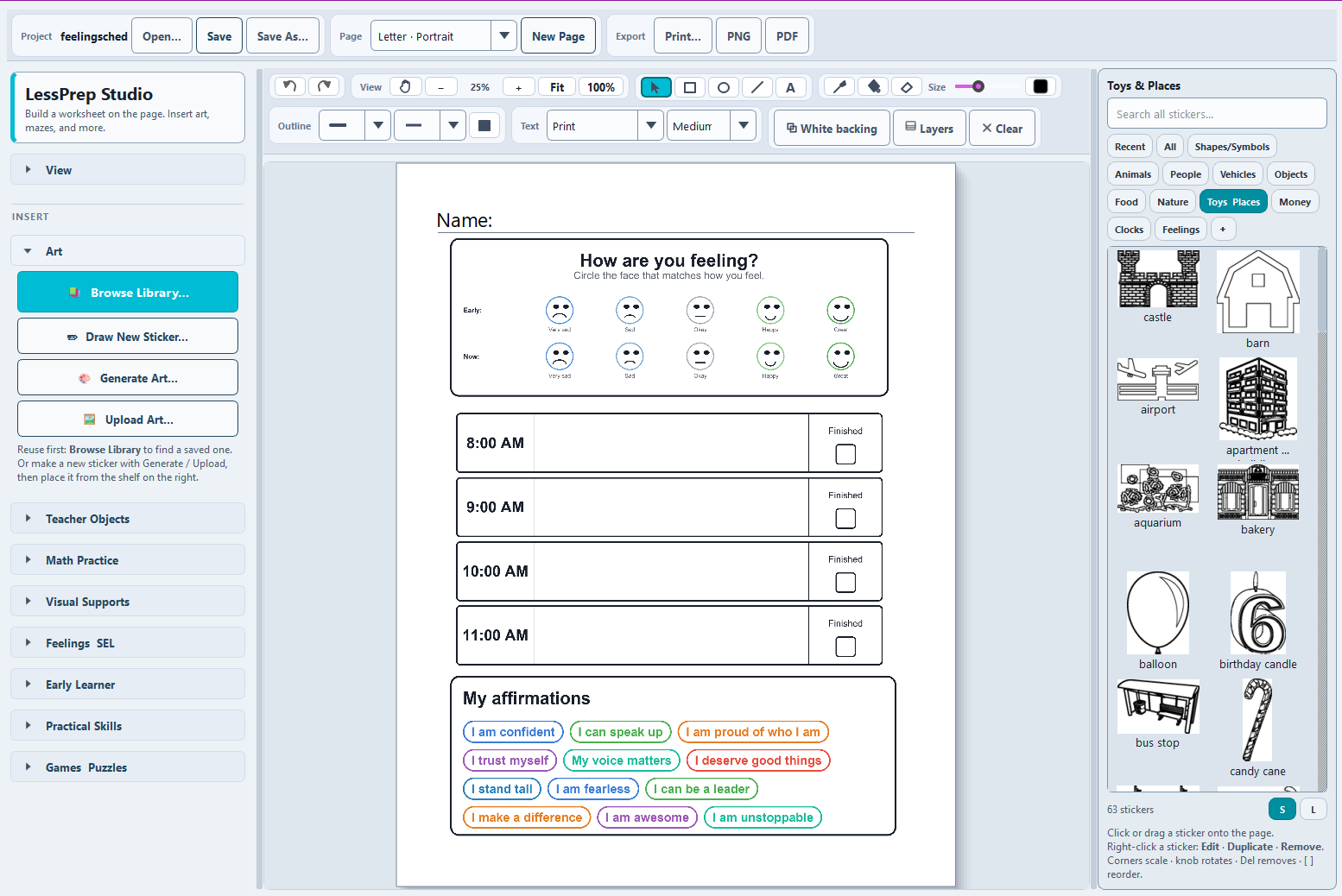
One editable LP Studio page: Feelings/SEL check-in, a visual schedule, affirmations, and the searchable sticker library.
What you get
One workspace, built the way you actually make materials.
A real worksheet canvas
Place text, shapes, activities, uploaded images, saved stickers, and generated art. Move, resize, duplicate, layer, and align — then touch up with marker, fill, and erase.
Useful learning objects
Drop in mazes, math practice, fractions, clocks, money, number lines, fact families, handwriting guides, and visual-support pieces.
Your art, your library
Upload an image, remove its background locally, and save it as a reusable sticker. Search the shelf whenever you need it again.
Local art generation
Make simple worksheet art on a supported graphics card — no prompt or learner material ever leaves your computer.
Editable project files
Save an LP Studio project and reopen it later. Autosave and recovery help protect longer editing sessions.
Print-ready output
Print directly or export Letter-size PNG and PDF pages at 300 DPI. Guides and the grid stay off the finished page.
Pricing
Pay what you want. Even nothing.
LessPrep Studio is in Early Access— a real, working app that's growing week to week. Name your own price at checkout; set it to $0and it's yours, no strings.
If it saves you prep time, paying what you feel it's worth helps me keep building — but that's entirely up to you. Either way you get the same full app and the updates that follow.
Before you download
What it runs on.
Requirements
- Windows 10 or 11 (64-bit)
- 8 GB RAM recommended
- ~5 GB free disk space for the app and model
- Runs locally — offline after install
About the art generator
On-device art generation needs a Vulkan-compatible graphics card. If your computer doesn't have one, that feature is turned off automatically with a clear note — and everything else (canvas, library, worksheet objects, printing) works normally.
After checkout, your download link is delivered by email through LemonSqueezy.
Ready when you are.
Early Access, available now, pay what you want. Set your price — $0 included.
Get LessPrep Studio →